Study apps for college · 2026 guide
Best Apps for Studying: Best Apps for College Students in 2026
No single app handles every part of studying well. Here is how to choose a small study stack for capturing information, organizing work, learning, scheduling time and focusing on the task.

Quick answer
What are the best study apps for college students?
The best study apps for college students are Notability for notes, Todoist for assignments, NotebookLM for turning sources into study guides, Google Calendar for protected study time, and FocusWindow for focused study sessions. Together, they cover the full college workflow: capture, plan, understand, focus and review.
Studying often feels inefficient for a simple reason: So many tools just do too much. Between lectures, readings, labs, assignments and exam prep, college students end up spending precious time customizing, fiddling with settings and switching between apps instead of learning.
Moreover, even the best study apps do not magically make you productive. They remove specific kinds of friction from learning.
This guide builds a practical study system around note-taking, planning, and study, to help you ace your college courses.
Quick comparison
The best study apps at a glance
| App | Best for | Platforms | Free plan | Main strength |
|---|---|---|---|---|
| Notability | Lecture notes and PDF annotation | Apple, Windows, web | Limited | Mixed handwritten and typed notes |
| Todoist | Assignments and next actions | Web, desktop, mobile | Yes | Fast, reliable task capture |
| NotebookLM | Studying your own sources | Web, iOS, Android | Yes | Source-grounded study materials |
| Google Calendar | Classes and time blocking | Web, iOS, Android | Yes | A realistic view of available time |
| FocusWindow | Focused desktop study sessions | Windows | Yes | Study tools and material in one workspace |
| MyStudyLife | School timetables and exams | Web, iOS, Android | Yes | Academic schedules built in |
| Anki | Long-term memorization | Desktop, mobile | Mostly | Powerful spaced repetition |
| Quizlet | Beginner-friendly flashcards | Web, iOS, Android | Yes | Fast sets and shared material |
| Forest | Phone-based focus motivation | iOS, Android, browser | Yes | Visible, gamified focus history |
| ChatGPT Study Mode | Guided explanations and practice | Web, iOS, Android | Yes | Interactive questions and feedback |
Best focus apps
Timers, blockers, accountability and immersive workspaces.
Open comparisonBest study planners
Assignments, class schedules and realistic weekly planning.
Open comparisonBest AI study apps
Source work, explanations, research and writing feedback.
Open comparisonBest Pomodoro apps
Simple timers, task-linked sessions and progress tracking.
Open comparisonDon't go on a download spree.
The easiest way to choose the best study apps for college students is to stop looking for one app that does everything.
For most students, the best study apps are the smallest combination that reliably moves information through five stages:
- Capture what you need to learn.
- Decide what needs to be done.
- Make uninterrupted time for it.
- Retrieve the information from memory.
- Review your progress and adjust.
Your note-taking app:
Notability
Your notes are the raw material of your study system.
Notability is essential for college students who have to organize lecture notes, tutorials, textbooks and more. You can combine handwriting and typing while organizing material digitally across a full semester of courses.
The iPad-native view, cross-device sync and extremely intuitive design makes it the best app for taking and reviewing lectures and assignments.
Feature sources: Notability official website and Notability getting started guide
No-frills, intuitive task management:
Todoist
Knowing what to study is different from knowing when you will study it.
Todoist works well because assignments can be broken into smaller tasks, given priorities, scheduled and organized by subject. Its task-duration and calendar tools can also help students estimate how much time their work will require, so that you can stay on top of your busy college schedule.
Todoist is primarily a task and planning system rather than a stopwatch-style time tracker. You can assign dates, times and durations, then place tasks into a calendar layout. If you want detailed actual-time tracking, pair it with a dedicated tracking integration.
For studying, estimated durations are often enough. Four tasks with 30, 45, 25 and 20 minute estimates create a two-hour plan instead of a vague instruction to "study tonight."
Feature source: Todoist time blocking guide
For school-specific calendars and alternative task managers, compare our recommended study planner apps for students.
Learn off your own sources:
NotebookLM
Notes help you capture information. They do not guarantee that you can explain it under pressure.
For dense course material — lecture slides, textbook chapters, PDFs, papers or recorded classes — Google NotebookLM can turn your uploaded sources into summaries, study guides, quizzes and even audio overviews.
Doing your own study online can often lead you astray, leading you down irrelevant rabbit holes.
NotebookLM strictly follows the documents you upload, so you can jump back to the original material whenever you need the full context.
That makes it one of the best study apps for college students when you need to distill, question and review what a large amount of material actually says, while staying on track with your course material.
Feature source: Google NotebookLM
NotebookLM is only one category of AI tool. Our AI study-app comparison separates source-grounded notebooks from tutoring, research and writing tools.
See your time at a glance:
Google Calendar
Calendars are boring, but they put the abstract concept of time into a concrete, visual format.
Classes, labs, work shifts, appointments, sports, commuting and sleep all compete with studying.
Start by adding fixed commitments. Then place study blocks in the remaining space.
Todoist can display calendar events alongside tasks and sync scheduled tasks with supported calendars, which makes the two tools complementary rather than redundant.
Calendars are easy to underestimate because they do not teach you anything directly, but missing out on proper time management can lead to poor study outcomes.
Calendar sources: Google Calendar event help and Google Calendar tasks help
Lock in with
FocusWindow
Planning, notes and retrieval solve only part of the problem. You still have to sit down and begin, which is where FocusWindow fits into the system.
FocusWindow isolates your workspace and declutters your environment, so there is no avenue for you to get distracted. It keeps your study session tools and source material together in one workspace.
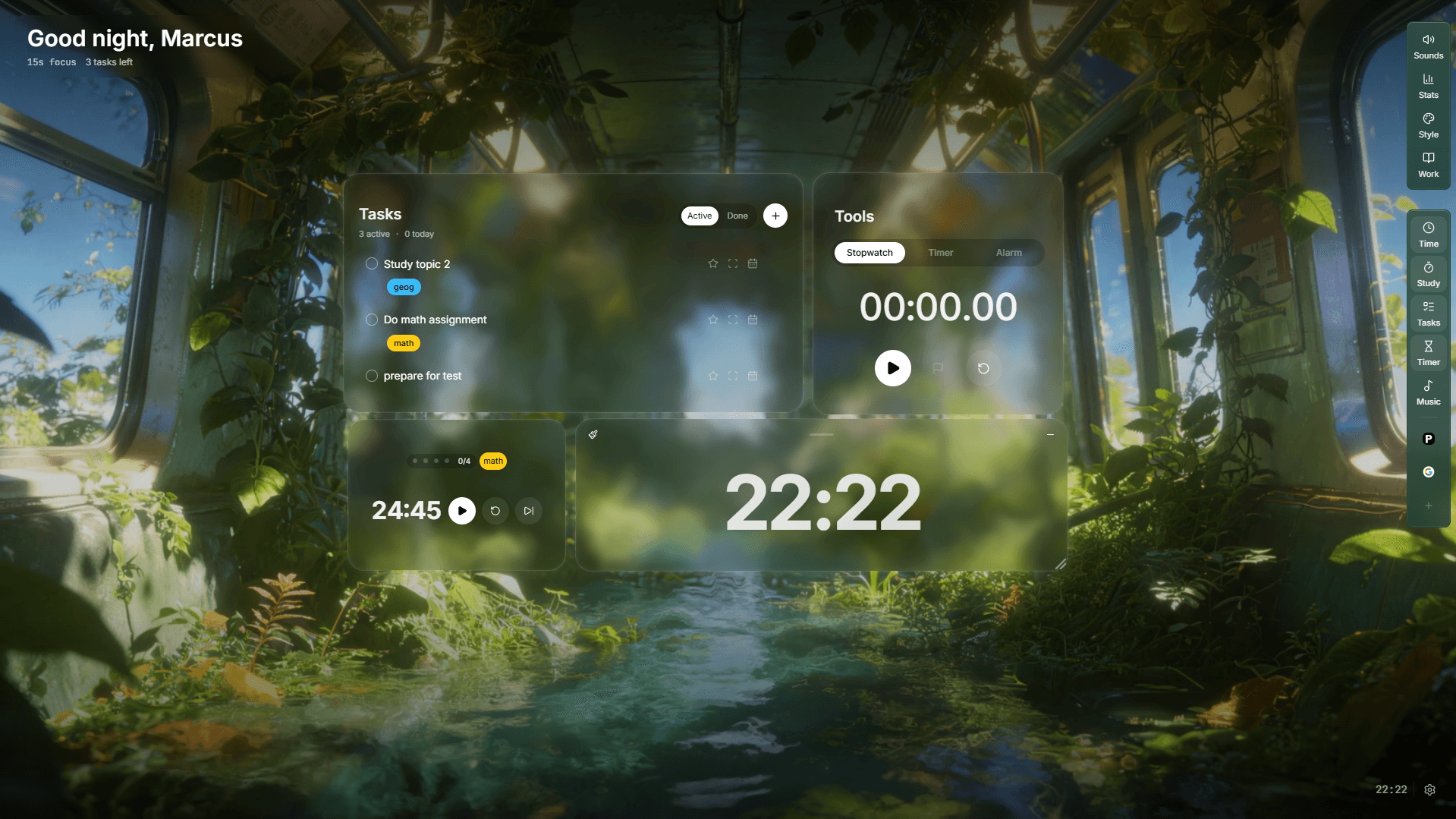
You can also use FocusTabs to keep reference material and apps within the workspace rather than repeatedly returning to a normal browser environment, tying together your workflow.
Learn more: Explore FocusWindow features
If you primarily need blocking or phone-based motivation, compare focus apps for different kinds of distraction. For timer-only workflows, see the best Pomodoro apps for students.
The study method matters more than the app
You could install every tool in this guide and still study badly.
These apps only support effective learning behavior. Research-based guidance from the U.S. Institute of Education Sciences recommends strategies including spacing learning over time, using quizzes to reinforce key content, and alternating worked examples with problem solving.
Use active recall instead of constant rereading
After reviewing a topic, close the source. Write everything you remember, answer questions without looking, complete practice problems from memory, then check your answers.
Space your reviews
Four one-hour sessions spread across several days are not equivalent to one exhausted four-hour cram. Spacing forces you to retrieve material after some forgetting has occurred.
Practice in the format you will need later
If your exam requires solving problems, solve problems. If it requires essays, outline essays. If you must explain concepts, practice explaining them aloud without notes.
Research source: Institute of Education Sciences study guide
How to combine study apps without creating more distraction
More is not better. Students download all of them, customize every dashboard, build complicated automations, and spend more time managing the system than studying.
Use a one-job rule:
- Notability stores learning material
- Todoist answers what should I do next
- Google Calendar answers when can I do it
- NotebookLM turns sources into study guides
- FocusWindow guides you to execute your study plan.
Do not keep one assignment list in your notes app, another in your calendar and a third in your task manager. Choose one source of truth for each type of information.
How do you know if your study system is working?
A beautifully organized dashboard means very little if you cannot answer exam questions.
This is another reason comparing the best study apps for college students only by feature count is misleading. Measure learning outcomes, not how productive your workspace looks.
Once a week, review four things:
- Planned versus completed study sessions: if you repeatedly schedule three hours but complete one, reduce the workload or create smaller sessions.
- Recall accuracy: if you cannot answer yesterday's questions without notes, increase retrieval practice.
- Weak topics: allocate more study time to chapters or concepts that consistently cause mistakes.
- Focused time: count uninterrupted work, not how long you sat near your desk.
A simple daily study routine
Once you have chosen the best study apps for college students, your routine should become almost boring. That is a good thing.
- Check your plan: Open your task manager and choose one important task plus one smaller backup task.
- Prepare your material: Open only the notes, textbook, questions or documents needed for the first task.
- Work in a focused block: Pick one clear outcome and study for 25 to 50 minutes without switching contexts.
- Test yourself: Close your notes and use flashcards, practice questions or a blank page to retrieve what you learned.
- Record the next action: Write down exactly where to resume so tomorrow's study session is easier to start.
This workflow is more important than rotating through scores of study apps in a semester.
If attention is still breaking after the workflow is clear, use our practical guide to stop getting distracted while studying before adding more software.
How many study apps should a college student use?
Add a new tool only when you can name the specific problem it solves.
The best study apps for college students are different for different majors. A pre-med student may depend heavily on handwritten notes, PDF annotation and AI study guides. A literature student may need stronger reading, annotation and essay-planning tools. An engineering student may spend much more time working through practice problems.
Your stack should follow the demands of your subjects.
Frequently asked questions
What are the best study apps for college students?
The best study apps for college students cover the jobs a semester actually requires: Notability for lecture notes, Todoist for assignments and planning, NotebookLM for turning sources into study guides, Google Calendar for protected study time, and FocusWindow for focused study sessions. Together they cover capture, plan, understand, focus and review.
What is the best note-taking app for college students?
Notability is a strong choice for college students who want handwriting, typing, PDF annotation, audio recording, transcripts, summaries, flashcards and quizzes in one notes app for lectures, textbooks and annotated readings.
What is the best study app for time management in college?
Todoist is useful for turning college assignments into specific tasks, adding priorities and durations, and time-blocking work in a calendar view. Pairing it with Google Calendar makes the plan more realistic around classes, labs and other commitments.
Is Google NotebookLM good for college students?
NotebookLM is useful for college students when you upload your own lecture notes, PDFs, slides or recordings. It can generate summaries, study guides, quizzes and audio overviews grounded in your sources, with answers that cite the original material.
Are study apps actually effective for college students?
Study apps are effective for college students when they support proven learning behaviors such as active recall, spaced review, realistic planning, quizzing and uninterrupted practice. An app that only organizes material is less useful than a system that helps you retrieve and apply it before exams.
What is the best free study app?
There is no single best free app for every study job. Google Calendar is excellent for scheduling, NotebookLM for studying a defined source set, MyStudyLife for academic planning, and Forest for mobile focus. Choose the one that fixes your biggest point of friction first.
How many study apps should I use?
Most students need three to five tools with clearly separate jobs. Keep one source of truth for assignments, one calendar, one place for course material, and only the learning or focus tools you use during real sessions.
Final verdict
The best study apps for college students disappear into your routine, removing the friction of focusing.
Published by
FocusWindow Editorial