
Focus apps · Compared for 2026
Best focus apps for students in 2026
A focus app is only useful if it deals with the thing that keeps derailing you. Maybe that is your phone. Maybe it is a browser full of open tabs, or the small act of assembling four tools before you can begin. These five apps take quite different approaches, and none is the right answer for everybody.
Quick answer
A quick way to pick
Use FocusWindow if your desktop study setup is scattered, Forest if you cannot leave your phone alone, Freedom if distractions follow you across devices, and Cold Turkey if you keep bypassing softer blocks. Focusmate is the odd one out: it gives you another person to show up for when starting alone is the hard part.
At a glance
Quick comparison
| App | Best for | Platforms | Free plan | Why use it |
|---|---|---|---|---|
| FocusWindow | An immersive study workspace | Windows desktop | Yes | Keeps timers, tasks, music and study material together |
| Forest | Simple, motivating mobile focus | iOS, Android, browser | Yes | Turns completed focus time into a visible forest |
| Freedom | Blocking distractions across devices | Windows, macOS, iOS, Android, ChromeOS/Linux | Yes | One block session can cover multiple devices |
| Cold Turkey | Hard-to-bypass desktop blocking | Windows, macOS | Yes | Very strict lock options for sites and desktop apps |
| Focusmate | Body doubling and accountability | Web | Yes, three sessions per week | A real person creates a reason to show up |
We checked features and availability against each product's official documentation on August 9, 2026. Prices and features may change.
How we compared the apps
We read the official product documentation and judged each app by the student problem it claims to solve. This is a researched comparison. We did not pretend to conduct identical long-term tests on every product.
- The problem each app is meant to solve
- Whether it works on the devices students use
- What the free version can genuinely do
- How easy the controls are to bypass
- How much setup and maintenance the app adds
Our recommendations
01
FocusWindow: best for an immersive study workspace
- Best for
- An immersive study workspace
- Platforms
- Windows desktop
- Price
- Free plan; optional Pro plan
- Best alternative
- Forest for mobile-first focus
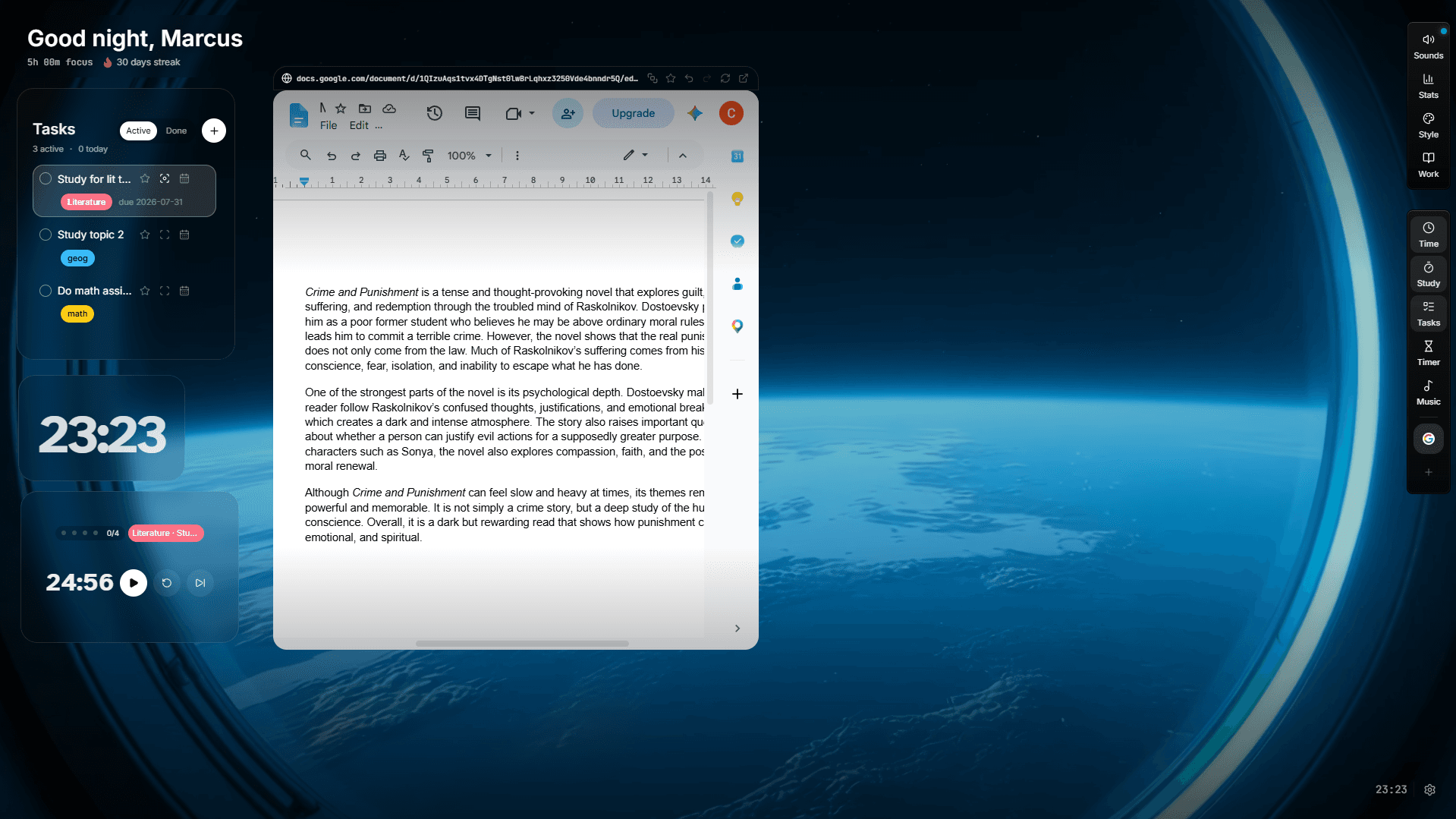
FocusWindow builds the countdown into a wider study session. One desktop workspace holds a Pomodoro timer, subject-based tasks, ambient scenes, music, progress tracking and FocusTabs for course material.
It makes sense when you lose your train of thought while jumping among a browser, timer, task list and music app. If social apps on your phone are the real issue, use a dedicated blocker instead.
Pros
- Purpose-built student workspace
- Combines execution tools and study material
- Visible session history
Cons
- Windows desktop only
- Not a system-wide blocker across every device
The catch: Desktop-first and less useful if you only need phone blocking
Source: Explore FocusWindow features
02
Forest: best for simple, motivating mobile focus
- Best for
- Simple, motivating mobile focus
- Platforms
- iOS, Android, browser
- Price
- Free tier; optional Plus subscription
- Best alternative
- FocusWindow for a fuller study workspace
Forest gives the timer a small consequence. A tree grows while you stay in the session, and stricter modes can block apps. Over time, the forest becomes a simple record of the hours you managed to protect. Some students will find that more satisfying than another row of statistics.
Pick it when the phone is the temptation. Forest will not replace your planner or the desktop setup you use for research, writing and problem sets.
Pros
- Useful free core experience
- Immediate visual motivation
- Mobile app blocking and group sessions
Cons
- Gamification will not suit everyone
- Limited planning depth
The catch: The game loop may feel lightweight for complex desktop study
Source: Forest features and plans
03
Freedom: best for blocking distractions across devices
- Best for
- Blocking distractions across devices
- Platforms
- Windows, macOS, iOS, Android, ChromeOS/Linux
- Price
- Free tier; Premium subscription
- Best alternative
- Cold Turkey for stricter desktop-only blocking
Freedom suits the student who closes social media on a laptop and immediately reaches for a phone. A single session can block selected sites, apps or most of the internet across several devices.
The free tier covers immediate sessions. Recurring schedules, longer sessions and Locked Mode require Premium. Freedom is a blocker, so assignments and course material still need somewhere else to live.
Pros
- Broad platform coverage
- Custom blocklists
- Cross-device sessions
Cons
- Best controls are paid
- Adds friction if blocking is not your real problem
The catch: Advanced scheduling and Locked Mode require Premium
Source: Freedom plan comparison
04
Cold Turkey: best for hard-to-bypass desktop blocking
- Best for
- Hard-to-bypass desktop blocking
- Platforms
- Windows, macOS
- Price
- Free version; one-time Pro purchase
- Best alternative
- Freedom for cross-device blocking
Cold Turkey is deliberately unforgiving. You can block websites, desktop applications or the whole internet, then lock the settings so an active block is difficult to change or uninstall.
That severity helps if you know exactly what needs to disappear during a study block. It is a bad fit for open-ended research, and it does nothing about distractions on a phone.
Pros
- Strong enforcement
- Detailed schedules and exceptions
- One-time paid upgrade
Cons
- Desktop only
- A badly configured strict block can interrupt required work
The catch: No mobile app and less gentle than timer-led tools
Source: Cold Turkey feature list
05
Focusmate: best for body doubling and accountability
- Best for
- Body doubling and accountability
- Platforms
- Web
- Price
- Free limited plan; Plus subscription
- Best alternative
- Forest for private, on-demand motivation
Focusmate pairs you with another person for a booked video session. You each state a goal, work quietly and check in at the end. The arrangement can get you past a starting problem that no timer or website block will fix.
It is awkward if you need to study on impulse, cannot use a camera or simply concentrate better alone. The free allowance is enough for occasional accountability, not unrestricted daily use.
Pros
- Strong start-time accountability
- Short and longer session options
- Useful free allowance
Cons
- Not fully on demand
- Video presence may be uncomfortable or impractical
The catch: Requires booking and being on camera
Source: Focusmate plans
How to choose a focus app
Do not begin with a feature checklist. Begin with the moment your concentration breaks. Otherwise, you are likely to download another app, configure it for an evening and forget it by Friday.
- 01
You keep picking up your phone
Try Forest or another mobile blocker that makes you commit as soon as the session begins.
- 02
You escape into websites on several devices
Use Freedom so the same blocklist follows you from one device to the next.
- 03
You disable every blocker
Use Cold Turkey, then test a short locked block before scheduling anything long.
- 04
Your study tools are scattered
Use FocusWindow to keep the timer, next task and course material in the same place.
- 05
You cannot make yourself begin
Book Focusmate or study beside someone who expects you to show up.
Related: diagnose why you get distracted while studying · compare Pomodoro apps for timer-led sessions
Focus apps vs website blockers
A focus app helps you settle into a session with a timer, a task, a visual cue, sound or accountability. A blocker has a narrower job: it removes access to something you already know will distract you.
If the task is clear but your hand keeps opening social media, start with a blocker. If the task, notes and timer are scattered across your desktop, try a workspace. One light tool from each category is plenty. Three timers are still just three timers.
A practical focus app routine
Before you start, write a finish line you can see: 'answer questions 1 to 8 and mark anything I cannot explain.' Put your phone out of reach, choose a 25- or 50-minute block and close every source you do not need. When time is up, write down the next action before you leave the desk.
Frequently asked questions
What is the best free focus app for students?
Forest has a useful free core if you want phone-based motivation and app blocking. Freedom can run immediate blocks across several devices. Pick Forest for a timer you commit to, or Freedom for a blocklist that follows you around.
Do focus apps actually help?
They can, but only when they remove a specific obstacle. That might be getting started, resisting one familiar distraction, gathering your material or showing up at a set time. An app is much less useful when you do not understand the assignment.
Is a Pomodoro timer the same as a focus app?
No. A Pomodoro timer structures work and breaks. A focus app may also block distractions, organize tasks, provide accountability or create a dedicated workspace.
Should I use more than one focus app?
Usually one session tool and, if needed, one blocker are enough. Avoid running several timers or maintaining duplicate task lists.
Read next