
Study apps · 2026 comparison
Immersive Study Apps: 5 Best Options for Students
A practical comparison of virtual study rooms, aesthetic dashboards and customizable focus workspaces.

Quick answer
Which immersive study app is best?
LifeAt is best for virtual rooms and group study; Flocus for an aesthetic browser dashboard; FocusWindow for a customizable workspace with study material built in; Lofi Town for gamified social focus; and StudyFocus for Android timers and tracking.
A timer can tell you when to study, but it cannot make a noisy room or a distracting environment feel like a productive place to work.
That is where immersive study apps come in. These apps combine virtual study rooms, calming backgrounds, ambient sounds and focus tools to create a more inviting digital workspace.
Some prioritize aesthetics. Others add social accountability, task management or detailed progress tracking. The best choice depends on whether you need atmosphere, structure, company or greater control over your study setup.
We compared five immersive study apps based on their features, customization, ease of use and suitability for different study styles.
This is the environment-focused branch of our broader comparison of focus apps for students. If your main problem is social media or compulsive browsing, start there instead.
At a glance
The five best immersive study apps
| Rank | App | Best for |
|---|---|---|
| 01 | LifeAtVirtual spaces and group studying | Virtual spaces and group studying |
| 02 | FlocusAesthetic browser-based productivity | Aesthetic browser-based productivity |
| 03 | FocusWindowCustomizable study functionality | Customizable study functionality |
| 04 | Lofi TownGamified social studying | Gamified social studying |
| 05 | StudyFocusMobile timers and study tracking | Mobile timers and study tracking |
What are immersive study apps?
Immersive study apps are productivity tools that recreate some of the atmosphere of a dedicated study space on your computer or phone.
Most provide visual backgrounds, focus music, ambient study sounds or virtual rooms. Many also include a Pomodoro timer, task list, notes and a focus tracker.
The aim is not simply to make studying look attractive. A useful virtual study environment should reduce the effort needed to begin a session and keep essential tools close at hand.
Common features include:
- Animated cafés, libraries and nature scenes
- Pomodoro, countdown and stopwatch timers
- Rain, fireplace, café and white-noise audio
- Tasks, notes and study goals
- Focus statistics and daily streaks
- Shared study rooms or body doubling
- Built-in access to study resources
The strongest immersive study apps combine an appealing environment with tools that support real work.
Best for virtual study spaces
LifeAt
LifeAt is one of the most recognizable options in this category. Its main attraction is its large collection of virtual environments, ranging from quiet libraries and cafés to beaches, city views and fantasy-inspired rooms.
You can place productivity widgets over your chosen scene, including a Pomodoro timer, stopwatch, task list, notes, calendar and clock. Music and ambient audio can then be added to complete the environment.
LifeAt also supports shared focus spaces. Students can use synchronized environments and Pomodoro sessions while communicating through integrated chat and video tools.
That makes it one of the better immersive study apps for people who find it easier to concentrate when others are visibly working nearby.
Key features
- Extensive selection of virtual spaces
- Pomodoro timer and stopwatch
- Tasks, notes and calendar tools
- Music and ambient sound
- Shared focus rooms
- Synchronized group sessions
- Browser-based access
Who LifeAt is best for
LifeAt is best for students who want plenty of environments to explore or who benefit from online body doubling.
Possible drawback
The large selection of spaces and widgets can create its own form of distraction. Students who frequently change backgrounds or rearrange their setup may spend more time customizing than studying.
Feature source: LifeAt official website
Best for an aesthetic productivity dashboard
Flocus
Flocus combines the appearance of an aesthetic study app with the structure of a browser-based productivity dashboard.
Its visual themes range from minimalist backgrounds to animated destinations. Users can also add their own images or YouTube backgrounds, depending on their plan.
The timer is particularly flexible. Flocus supports Pomodoro, countdown, stopwatch and Animedoro modes, with customizable intervals, breaks and alerts. A selected task can remain visible during each session.
Flocus also includes priority-based tasks, focus statistics, music and layerable soundscapes. Available audio includes rain, café noise, fireplaces, white noise, brown noise and binaural beats.
Key features
- Static and animated themes
- Multiple customizable timer modes
- Priority-based task list
- Focus statistics and streaks
- Layered ambient sounds
- Built-in and connected music
- Picture-in-picture timer
Who Flocus is best for
Flocus is best for students who want a polished, attractive dashboard that runs directly in their browser.
Possible drawback
Although Flocus has strong productivity features, it remains more dashboard-like than room-like. Students seeking a social virtual world may prefer LifeAt or Lofi Town.
Feature source: Flocus official website
Best for customizable study functionality
FocusWindow
FocusWindow takes a more functional approach to immersion. Instead of treating the visual environment as the main product, it lets students build a desktop workspace around the session they need to complete.
Users can arrange timers, tasks, notes, music and study tools within their workspace. They can also customize scenes and ambient layers to create a setup suited to reading, revision, essay writing or problem-solving.
Its most distinctive feature is FocusTabs. These embedded browser views let students open course material, notes, documentation, references and useful web apps without returning to a conventional browser window filled with unrelated tabs.
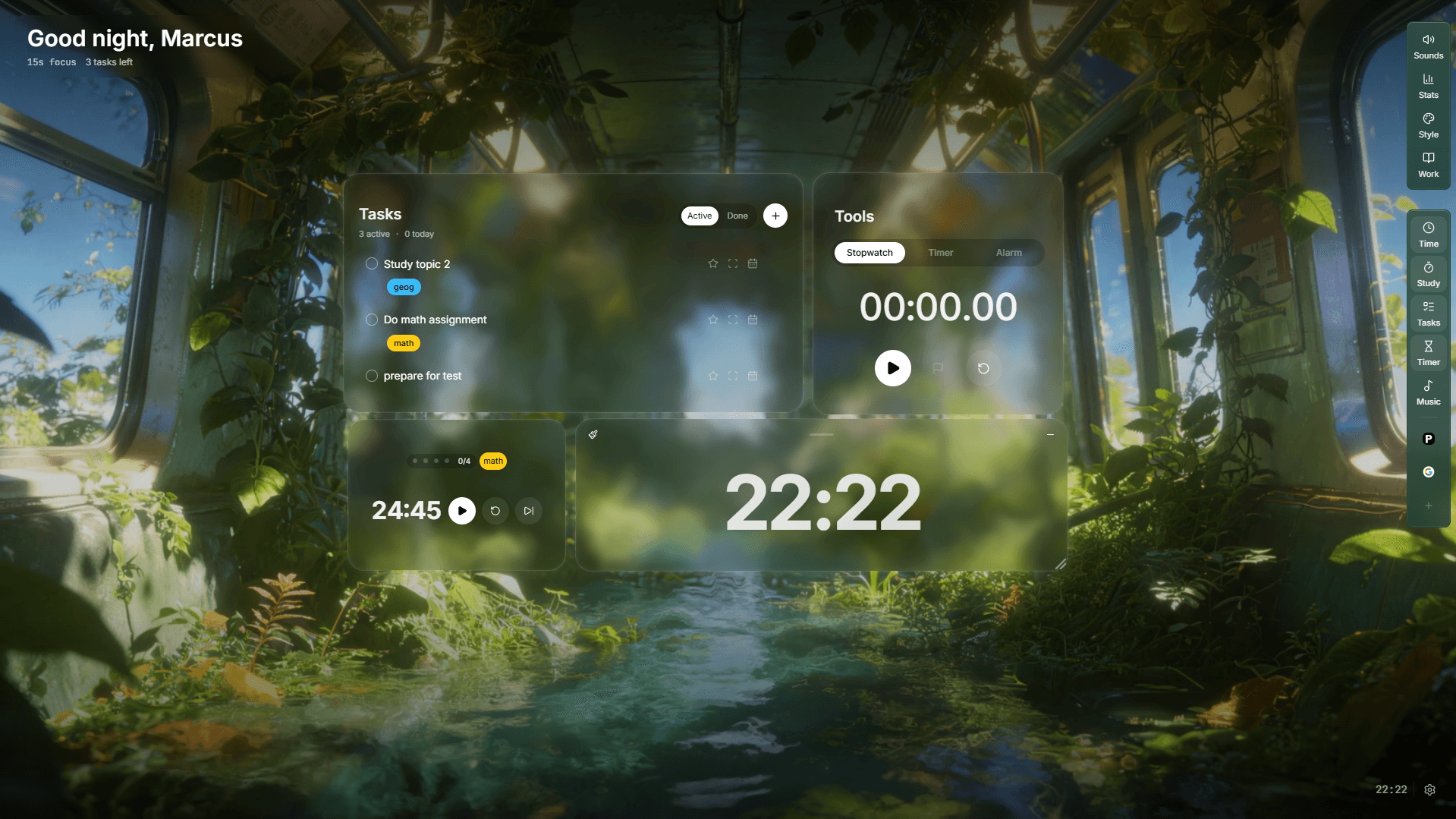
Tasks can also be organized by subject, while progress tools record focus sessions, daily history and longer-term patterns. Pro features add expanded customization, goals, complete progress history and workspace syncing.
Key features
- Customizable desktop workspace
- Embedded FocusTabs
- Pomodoro and focus timers
- Tasks organized by subject
- Notes and music tools
- Ambient scenes and sound layers
- Session history and progress tracking
- Workspace synchronization
Who FocusWindow is best for
FocusWindow is best for students who want more control over how their study tools and materials are arranged. It is particularly relevant to anyone who normally switches between a timer, task manager, music player, browser, notes and course platform during one session.
Possible drawback
The platform is still growing, so it might not have some features other battle-tested apps have.
Learn more: Explore FocusWindow features
Best for gamified social studying
Lofi Town
Lofi Town turns focused work into a cozy multiplayer experience.
Instead of opening a traditional productivity dashboard, users enter a lofi-inspired virtual world in which they can study, work and spend time with friends. The platform combines Pomodoro timers and task lists with social body doubling and an explorable environment.
This can make a routine study session feel more engaging, particularly for students who already enjoy pixel-art games or online social spaces.
The presence of other users may also provide gentle accountability. Even without active conversation, seeing other people working can make an individual session feel less isolated.
Key features
- Cozy virtual world
- Multiplayer study spaces
- Pomodoro timer
- Task lists
- Social body doubling
- Game-inspired visuals
- Free access
Who Lofi Town is best for
Lofi Town is best for students who find conventional productivity interfaces dull and are motivated by social or game-like environments.
Possible drawback
The features that make it engaging can also compete for attention. Exploring the map or interacting with friends may not suit students who need an especially quiet, distraction-free study app.
Product source: Lofi Town official website
Best for mobile study tracking
StudyFocus
StudyFocus is a more conventional mobile focus app, but its timers, ambient sounds and gamified tracking make it relevant to students comparing immersive study apps.
The Android app includes several timer styles, daily quests, notes, a reading tracker, ambient audio and a leaderboard. Its core version is free, while an iOS release is listed as being in development.
Rather than recreating an elaborate digital room, StudyFocus concentrates on turning completed sessions into visible progress. That makes it suitable for students who primarily work from a phone or who prefer goals and tracking over animated scenery.
Key features
- Multiple timer styles
- Ambient sounds
- Daily study quests
- Reading tracker
- Notes and book tracking
- Leaderboard
- Android availability
Who StudyFocus is best for
StudyFocus is best for Android users who want a mobile study timer with light gamification and progress tracking.
Possible drawback
It does not provide the same desktop-style virtual environment as the first four options. Students seeking an all-in-one online study space may find it too limited.
Feature source: StudyFocus official website
How we ranked these immersive study apps
There is no objective winner for every student. A virtual room, social world and customizable desktop workspace solve different problems.
We considered five main factors:
- Immersion: Does the app create a distinct study atmosphere?
- Functionality: Does it provide useful tools beyond a background and timer?
- Customization: Can students adapt the workspace to different tasks?
- Focus support: Does it reduce switching or introduce more distractions?
- Accessibility: Is the core experience easy to access and understand?
The order reflects how broadly each app serves the category. The individual “best for” labels are more useful than the numerical ranking when choosing a tool.
Start with the problem affecting your study sessions, then choose the app designed to address it.
Which immersive study app should you choose?
- 01
LifeAt if you want virtual spaces and group studying.
- 02
Flocus if you want aesthetic browser-based productivity.
- 03
FocusWindow if you want customizable study functionality.
- 04
Lofi Town if you want gamified social studying.
- 05
StudyFocus if you want mobile timers and study tracking.
Are immersive study apps actually useful?
These apps are useful when they remove friction from the beginning of a study session.
Opening the same environment, selecting a task and starting a timer can become a repeatable cue for focused work. Ambient sound may also help mask unpredictable background noise.
However, a visually impressive interface does not automatically produce better learning. The app should remain behind the work rather than becoming the work.
Try each option during two or three real sessions. Record:
- How long it took you to begin
- How often you switched away
- Whether you completed the planned task
- Whether the environment felt calming or distracting
- Whether you would use the same setup again
Judge immersive study apps by the work you complete, not by how productive their interfaces make you feel.
Related focus guides
Choose the next step by the problem
Frequently asked questions
What is the best immersive study app?
LifeAt is a strong choice for virtual spaces and group study. Flocus suits students who want an aesthetic browser dashboard, FocusWindow is best for customizable functionality and embedded study resources, and Lofi Town is the strongest gamified option.
Are there free immersive study apps?
Yes. All five apps in this comparison provide a free experience or free core features, although premium plans may unlock additional scenes, sounds, history or customization. Check each product’s current pricing before choosing because plans can change.
Can I use an immersive study app for Pomodoro sessions?
Yes. Most immersive study apps include a Pomodoro timer or another adjustable focus timer. LifeAt, Flocus, FocusWindow, Lofi Town and StudyFocus all support timed study in some form.
Are virtual study rooms distracting?
They can be. Fast animations, frequent customization and social features may pull attention away from the task. Start with a simple scene and one sound layer, then add elements only when they serve a clear purpose.
Final verdict
The current generation of immersive study apps offers more than attractive backgrounds. Students can now choose between shared rooms, customizable dashboards, game-like worlds and complete desktop workspaces.
LifeAt is the most versatile choice for virtual environments and collaborative studying. Flocus provides an especially polished balance of aesthetics, timers and task management.
Students who want more control over the functional side of their setup should consider FocusWindow. Its combination of workspace customization, subject-based tasks, progress tracking and FocusTabs makes it particularly suited to sessions involving several digital resources.
Published by
FocusWindow Editorial